2.17.2019

How to Turn off iOS Activation Lock without Password 2019


How to Turn off iOS Activation Lock without Password 2019
Ask the Previous Owner to Remove iOS Activation Lock

It is quite possible that you open your Apple device and find that iOS activation lock is still linked to the previous owner’s account. You need to contact the previous owner and ask them to erase the device and remove the iOS activation lock. The screen might view either of the two things.
1. Remove Account When It Asks for Apple ID and Password

If the device asks for both an Apple ID and passcode, it means the device has already been erased. You can contact the previous owner to follow the steps below to remove their account.


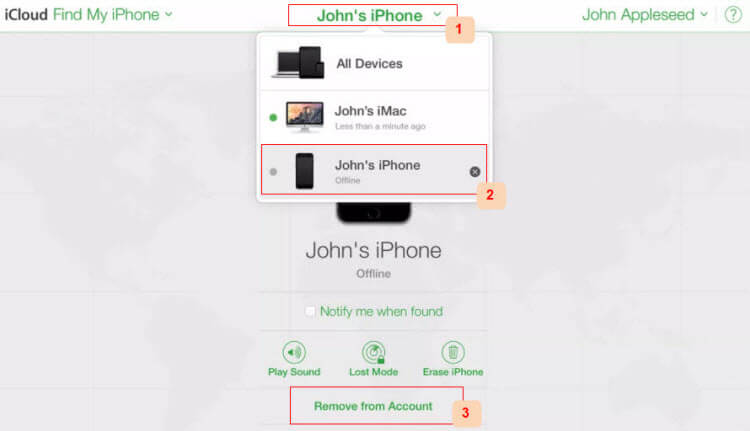
Go to https://www.icloud.com and log in with his Apple ID and password.


Click on “Find iPhone”.


Tap “All Devices” and choose your device.


Hit “Remove from Account”.

Then you restart your iDevice. It won't be linked to the previous Apple ID any more. You just need to follow the onscreen instructions to set it up and enjoy it.

2. Remove Account When It Asks for Only Password

If the device asks for only password for an existing Apple ID, it means the device hasn’t been erased yet. The previous owner should remotely erase the device and then remove the device from his iCloud account.


Go to https://www.icloud.com and log in with his Apple ID and password.


Find and select “Find iPhone”.


Tap “All Devices” at the top and choose your iDevice.


Tap “Erase iPhone/iPad”.


Enter their Apple passcode and hit “Next”. Then hit “Next” again without entering a phone number.
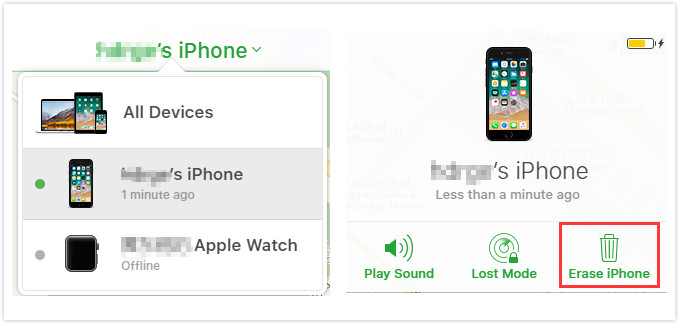


When it's done, everything in your device will be deleted including the Apple ID account. But note that, this takes effective only when your iPhone has internet.
How to Check for iOS Activation Lock Before Purchasing An iDevice

Instead of going through all this trouble it is better that you check your iDevice for the iOS activation lock before purchasing one that is already used.


You can check iOS activation lock status of your device by visiting https://icloud.com/activationlock from any computer.


Or you should switch on the device and see if there is any passcode required to continue. You would know it instantly if the device has an iiOS activation lock or not. To completely ensure that the device is safe to purchase from an authorized retailer. If you see the screen displaying “Set up your iPhone” “Set up your iPad” or “Set up your iPod” you should be content that the device does not have an iOS activation lock.
When do We Need to Turn off iOS Activation Lock


Erase your iDevice and turn off iOS activation lock before you sell or give away your device. Or other person can not activate and use the device.


Turn off iOS activation lock before sending your device to repair. (It is always wise to play safe. If you are concerned about your privacy, you can also back up your data and reset.) Or the technicians cannot be able to perform service on your device.

Sponsor ads:

Jihosoft iPhone Data Recovery:https://www.jihosoft.com/recovery/ios-data-recovery.html

Jihosoft iPhone Data Recovery

Free iPhone Data Recovery Software for Windows/Mac

Recover up to 12+ types of files, including contacts, SMS, photos, WhatsApp, Viber, notes, etc.

Restore lost data from iOS devices directly or from iTunes and iCloud backup

Recover iPhone data lost due to iOS upgrade/jailbreak, accidental deletion, device lost or broken

Support all the latest iPhone, iPad and iPod Touch.

Tips:

How to transfer messages from iPhone to iPhone

Gihosoft Free iPhone Data Recovery:https://www.gihosoft.com/iphone-data-recovery-free.html


Gihosoft iPhone Data Recovery Free

2.12.2019

Apple to Host an Event on March 25 for Upcoming Subscription Services


If reports are accurate, then Apple is asking publishers for 50% of the revenue cut for its planned News subscription service.

That may suggest the company is expecting this new subscription service to be a hit among customers. And what may be another signal of that idea is an entire event scheduled to unveil that service. At least, that’s what BuzzFeed is reporting today. According to the publication, Apple is ready to promote its upcoming News subscription service in a big way, and it will unveil it during an event scheduled for Monday, March 25.

This will apparently not be an event to unveil the AirPods 2, or even a new iPad mini. It will take place at the Steve Jobs Theater on the Apple Campus.

“Apple has settled on a date for its first big product announcement of 2019. Sources tell BuzzFeed News that the company plans to hold a special event on March 25 at the Steve Jobs Theater on its Apple Park campus. Headlining the gathering: That subscription news service that has been all over the news today. Unlikely to make an appearance: next generation Airpods, or that rumored new iPad Mini.

Sources described the event as subscription services focused, but declined to say anything about Apple’s standalone video streaming service which is also rumored to debut in 2019.”

However, as noted above, this could be an event that’s not just about the News subscription service, but rather Apple’s new subscription services in general. That includes Apple’s own movies and TV streaming service, which is expected to launch in April. Indeed, there was a previous rumor that said Apple would offer up a big bundle for its News and original content streaming efforts, so an event could be a way to promote all of it at once.

It is worth noting that the report does suggest the company may change its plans if it can’t nail down negotiations with publishers. That was previously reported to not be going very well, as Apple is reportedly demanding 50% of the revenue from publishers.

So, circle that date on the calendar with a pencil just in case.

[via BuzzFeed]

Sponsor ads:

Gihosoft Free iPhone Data Recovery:iphonerecovery.com

Free iPhone Data Recovery Software for Windows/Mac

Recover up to 12+ types of files, including contacts, SMS, photos, WhatsApp, Viber, notes, etc.

Restore lost data from iOS devices directly or from iTunes and iCloud backup

Recover iPhone data lost due to iOS upgrade/jailbreak, accidental deletion, device lost or broken

Support all the latest iPhone, iPad and iPod Touch

Both Free and Pro version.

If you lost data after you updated to a new iPhone, you can always use Gihosoft iPhone Data Recovery to get the data back from the old iPhone or backup.

Top 10 Best FRP Bypass Tools to Bypass Google Account on Android Device 2019

Worth reading:download youtube 1080p

If you use android phones, please choose Gihosoft Android Data Recovery


Jihosoft Android Data Recovery: the best Android Data Recovery software for Windows and Mac to recover deleted contacts, messages, photos, videos, WhatsApp and etc from Android

1.31.2019

Apple Has Now Blocked Google From Running Its Internal iOS Apps and Betas


What started as a pretty big Facebook issue transformed into an equally-sized Google issue, and Apple has responded in kind.

The Verge reports on Thursday that Apple has pulled the plug on several different Google-owned iOS apps, blocking the company’s internal apps. This prevents Google from distributing these apps altogether, meaning early versions of Google Maps, Hangouts, Gmail, and other “pre-release beta apps have stopped working today”. Google’s other internal apps, like Gbus for transportation and Google’s own cafe app, have also stopped working.

The block comes on the heels of details regarding Google’s “Screenwise Meter” app, which worked in a similar way to Facebook’s Research VPN iOS app to collect user data, basically unrestricted. In those cases users agreed to have their data mined and collected by each company, all in return for monetary compensation in one way or another. The issue, though, came down to how these companies handled Enterprise Certificates. Both companies were using these certificates to distribute apps to iOS users, which is against Apple’s App Store policy.

Apple blocked Facebook’s app and the social network eventually removed the app altogether from the App Store — but not before Apple pulled their certificates and stopped Facebook’s own internal apps from working as well. Google, for its part, did pull the Screenwise Meter app the same day it was discovered and reported on, but that hasn’t stopped Apple from doling out the consequences of knowingly running afoul of the App Store rules.

This is an interesting situation, as Apple has every right to implement ramifications for those who break clearly-printed rules to its digital storefront. But the company is definitely enacting a lot of power, which is not sitting well with some.

What do you think?

[via The Verge]

Sponsor ads:

Gihosoft Free iPhone Data Recovery:iphonerecovery.com

Free iPhone Data Recovery Software for Windows/Mac

Recover up to 12+ types of files, including contacts, SMS, photos, WhatsApp, Viber, notes, etc.

Restore lost data from iOS devices directly or from iTunes and iCloud backup

Recover iPhone data lost due to iOS upgrade/jailbreak, accidental deletion, device lost or broken

Support all the latest iPhone, iPad and iPod Touch

Both Free and Pro version.

If you lost data after you updated to a new iPhone, you can always use Gihosoft iPhone Data Recovery to get the data back from the old iPhone or backup.

Top 10 Best FRP Bypass Tools to Bypass Google Account on Android Device 2019

Worth reading:download youtube 1080p

Jihosoft Android Data Recovery: the best Android Data Recovery software for Windows and Mac to recover deleted contacts, messages, photos, videos, WhatsApp and etc from Android
If you use android phones, please choose Gihosoft Android Data Recovery

1.24.2019

What’s New in iOS 12.2


On Thursday, Apple seeded the first developer beta of iOS 12.2, and with it brought new features to the mix.

Apple added quite a bit of new items to its mobile operating system with iOS 12.2. We have put together a quick list of some of the bigger new additions, which you can find below. Of course, two of the biggest new features includes Canadian support for Apple News, and “Hey Siri” support for AirPods 2 (which are still not even official). Here’s the rest:


HomeKit TV Support and Controls: Apple has already announced third-party TVs from the likes of Vizio and Samsung will support AirPlay 2 this year. iOS 12.2 lays the groundwork for that. The beta includes support for third-party TVs, but also adds the ability to add certain TVs to the list of devices that can be sent content.


Updated Screen Mirroring Icon in Control Center: Apple has updated the Screen Mirroring icon in Control Center, making it a bit more obvious that you are mirroring two screens.


Faster Way to Add Money to Apple Cash: Apple has added an “Add Money” option when you tap on the Apple Pay Cash in the Wallet app. This makes it easier to quickly add funds.


A New AirPlay Icon: Apple has updated the AirPlay icon in Control Center, putting it more in line with the icon on other platforms like macOS.


Apple Shows Better Info for Unsecure Websites: Apple now shows “Not Secured” on an unsecured website in the URL, making it more obvious that a site isn’t offering an HTTPS connection.


Apple Maps Can Now Show Air Quality: You can find air quality for an area within the stock Weather app, but Apple is now bringing that information to Apple Maps. It can be turned on in the Maps Settings section.Must Read:If you lost data after you updated to a new iPhone, you can always use Gihosoft iPhone Data Recovery to get the data back from the old iPhone or backup.


Gihosoft Free iPhone Data Recovery:iphonerecovery.com

So, there we go. Quite a bit to add!

1.21.2019

How To Set Fingerprint Lock In Redmi Note 5 Pro


And for the benefits, setting fingerprint lock is sure convenient too. Just hold your device, place your finger on the scanner and whoosh! Your device will now get unlocked without having to type any password, prin or pattern. So, if you are someone who has Redmi Note 5 Pro and is scratching your head wondering how to set a fingerprint lock then you are at the right place! Just follow the steps that are mentioned below and learn how you can set a fingerprint lock in Redmi Note 5 Pro.

Redmi Note 5 Pro
How To Set Fingerprint Lock In Redmi Note 5 Pro:


To set fingerprint lock on your Redmi Note 5 Pro, go to your device’s “Setting” (you can find this in your app drawer, it has a gear-like icon).


Next, go to the subheading of “System & Device” and under that tap on “Lock screen & Password”.


Now, go to the first option of “Add fingerprint”, and then enter your device’s password or pin (if any).


Next, to add your fingerprint, place your finger on the sensor (this will be at the back of your device underneath the camera lens).


Once you placed your finger on the sensor, keep lifting it after you feel a vibration. As your finger will get register, the diagram of the finger on your device’s screen will get in blue color. So, move your finger accordingly to cover the sensor completely. (You will be guided with on-screen instructions throughout the process).


After that, your finger will get added, and then enter the name of your fingerprint lock by tapping on “fingerprint1”. Once entered tap on “Done” from the bottom of your screen and that’s it your fingerprint lock will get registered.

Once, you have set your fingerprint, you will get an option to either set it as Lock Screen, Privacy Password, or as an App Lock. You can select your preferred option by turning on the toggle.

Note: You can also add multiple fingerprints too with the same method and steps that are mentioned above. But the maximum limit of fingerprints that you can register is five.

Now, if you want to delete your fingerprint lock for whatever reason you can still do it, by just following the steps that are mentioned below.
How to delete fingerprint lock in Redmi Note 5 Pro:


Go to Settings and then under the subheading of “System & Device” tap on “Lock screen & Password”


Next tap on “Manage fingerprints” and then you will get the name of your added fingerprint, so tap on it.


Now, tap on “Remove fingerprint” and confirm your command by pressing “OK”. And that’s it done, your fingerprint will now be removed.

So, these were the steps through which one can easily set fingerprint lock in Redmi Note 5 Pro without any hassle. Also, the fingerprints can be deleted at any point or their name can also be changed. And if you still have difficulty to understand the process, don’t worry on-screen details are always there to guide you.

Sponsor ads:

Gihosoft Free iPhone Data Recovery:https://www.gihosoft.com/iphone-data-recovery-free.html

Gihosoft iPhone Data Recovery Free

Free iPhone Data Recovery Software for Windows/Mac

Recover up to 12+ types of files, including contacts, SMS, photos, WhatsApp, Viber, notes, etc.

Restore lost data from iOS devices directly or from iTunes and iCloud backup

Recover iPhone data lost due to iOS upgrade/jailbreak, accidental deletion, device lost or broken

Support all the latest iPhone, iPad and iPod Touch

Both Free and Pro version.

If you lost data after you updated to a new iPhone, you can always use Gihosoft iPhone Data Recovery to get the data back from the old iPhone or backup.You may also like: iphonerecovery.com

If you use android phones, please choose Gihosoft Android Data Recovery.

With Gihosoft Android Data Recovery, no longer afraid of data loss!

Must read:Youtube video downloader for pc

Gihosoft RePicvid Free Photo Recovery Software provides a free photo recovery software for windows to help users recover the deleted or lost photo for free.

Jihosoft Android Data Recovery: the best Android Data Recovery software for Windows and Mac to recover deleted contacts, messages, photos, videos, WhatsApp and etc from Android devices.Tips:How to transfer messages from iPhone to iPhone


jihosoft Free iPhone Data Recovery

1.15.2019

FullMusic11 – Bring back full screen in Music app


HOW FULLMUSIC11 WORKS

Beginning with iOS 10, Apple replaced the full-screen Now Playing view of iOS 9 with a containerized view.

Fortunately, there’s a way to go back to the full-screen Music app with this new tweak.

As its name suggests, FullMusic11 brings back the iOS 9-style full screen to the iOS 11 Music app. It is developed by tweak developer Soh Satoh.

Not only does it enables the full-screen mode for the Music app, but it also dynamically changes the color of the status bar, offers ColorFow 4 integration, and hides and change the position of the various user interface elements.

Check out the video demonstration of this tweak below.


Yalu Jailbreak@Yalujb

FullMusic11 brings back the full screen in Music app (dev - @soh_satoh). #Cydia #tweak

41

2:04 AM - Jan 15, 2019

See Yalu Jailbreak's other Tweets

Twitter Ads info and privacy

The Fullmusic11 tweak is released in two different versions – Full and Lite. The “Lite” version only enables the full-screen view whereas the “Full” version offers a lot of other customization options apart from the full-screen view.

Before you decide to install this tweak on your device, take a quick look at the difference between the stock view and the full-screen view in the “Now Playing” screen.
STOCK VIEW


FULL-SCREEN VIEW


SETUP


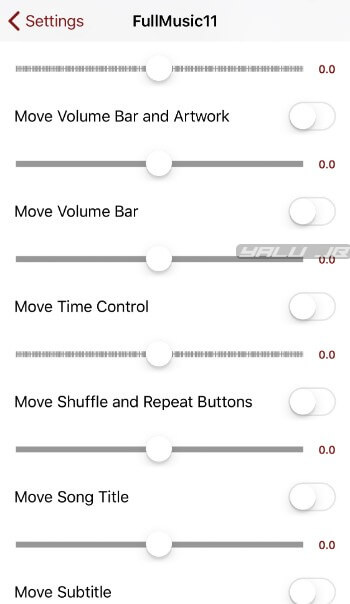
Enable – Enables the full-screen view in the Now Playing section.


Using ColorFlow 4 – Enables ColorFlow integration in the Music app.


Colorize Status Bar – Colors Status bar based on the background color. It also includes support for BatteryPercentX.


Hide an Arrow on Music App – Hides the top arrow on the Music app.


Draw Borders for Shuffle/Repeat – Separates the shuffle and repeat buttons from the main Now Playing view with a border.


Hide Lower Buttons on Now Playing – Hides the shuffle and repeat buttons.


Set Top Inset for Now Playing – Sets the top margin for the entire Now Playing section.


Move Volume Bar and Artwork – Moves volume bar and artwork up or down.


Move Volume Bar – Moves volume bar up or down.


Move Time Control – Moves time control up or down.


Move Shuffle and Repeat Buttons – Moves shuffle and repeat buttons up or down.


Move Song Title – Moves the song title up or down.


Move Subtitle – Moves the song subtitle up or down.


Move Control Buttons – Moves control buttons up or down.


Customize the various options and values however you want. Just make sure you use the “Respring” button to restart the Springboard.

If you mess something up, just scroll down and press the “Reset All Settings” to switch to the default values.
DOWNLOAD FULLMUSIC11 CYDIA TWEAK

While it can in no way replace many of the much more in-depth tweaks out there, FullMusic makes for a great addition to your existing setup.

For those of you who are into theming and user interface customization, this jailbreak tweak is worth an install if you are shooting for an iOS 9-esque setup. Recommended.

FullMusic11 is available for download on Packix repo for $1.00. It is compatible with iOS 11 and 12.
KNOWN ISSUES AND BUGS


In the latest version, some closing animations appear to be a bit clunky. The developer intends to fix this issue in the next version.

Sponsor ads:

Gihosoft Free iPhone Data Recovery:https://www.gihosoft.com/iphone-data-recovery-free.html

Gihosoft iPhone Data Recovery Free

Free iPhone Data Recovery Software for Windows/Mac

Recover up to 12+ types of files, including contacts, SMS, photos, WhatsApp, Viber, notes, etc.

Restore lost data from iOS devices directly or from iTunes and iCloud backup

Recover iPhone data lost due to iOS upgrade/jailbreak, accidental deletion, device lost or broken

Support all the latest iPhone, iPad and iPod Touch

Both Free and Pro version.

If you lost data after you updated to a new iPhone, you can always use Gihosoft iPhone Data Recovery to get the data back from the old iPhone or backup.You may also like: iphonerecovery.com

If you use android phones, please choose Gihosoft Android Data Recovery.

With Gihosoft Android Data Recovery, no longer afraid of data loss!

Must read:Youtube video downloader for pc

Gihosoft RePicvid Free Photo Recovery Software provides a free photo recovery software for windows to help users recover the deleted or lost photo for free.

Jihosoft Android Data Recovery: the best Android Data Recovery software for Windows and Mac to recover deleted contacts, messages, photos, videos, WhatsApp and etc from Android devices.Tips:How to transfer messages from iPhone to iPhone

jihosoft Free iPhone Data Recovery

1.14.2019

How to Delete iCloud Account Online

How to Delete iCloud Account Online

To delete iCloud account means losing most of your data and services. Secondary applications will also be deleted. Before you tap on the delete button, check on the Disabling iMessage section, especially if you had switched to another type of phone.

Download all files and messages from iCloud and save it on your PC or external hard drive. This is important because you will not have access to iCloud Drive Storage and iCloud Mail.

Steps on how to delete iCloud account online:

Step 1: Go to Apple ID website, https://appleid.apple.com/.

Step 2: Enter your email address and password to log in to your Apple ID account.

Step 3: Click on “get support PIN” or “Support PIN” depending on your authentication settings.

Step 4: Click on the blue button on the right side to generate PIN.

Step 5: Note down the PIN, you will need later.

Step 6: Go to https://support.apple.com/en-us/HT201232 to review phone number.

Step 7: Call a phone number in your region to connect to an automated assistant.

Step 8: To speak to a representative, say “Apple ID” then agree to speak to a representative by saying “yes please”.

Step 9: Ask for account deletion and share your iCloud account details including the Support PIN you wrote down.


Sponsor ads:

Jihosoft iPhone Data Recovery:https://www.jihosoft.com/recovery/ios-data-recovery.html

Jihosoft iPhone Data Recovery

Free iPhone Data Recovery Software for Windows/Mac

Recover up to 12+ types of files, including contacts, SMS, photos, WhatsApp, Viber, notes, etc.

Restore lost data from iOS devices directly or from iTunes and iCloud backup

Recover iPhone data lost due to iOS upgrade/jailbreak, accidental deletion, device lost or broken

Support all the latest iPhone, iPad and iPod Touch.

Tips:

How to transfer messages from iPhone to iPhone

Gihosoft Free iPhone Data Recovery:https://www.gihosoft.com/iphone-data-recovery-free.html


Gihosoft iPhone Data Recovery Free