9.17.2019

Google’s Key Moments Makes It Easier to Search for Content within Videos

Thanks to Google it is easy to search for stuff on the Internet. The search giant has taken the video search a step further by adding a new feature. Google has detailed how it will display videos in search results. Starting now, Google will also highlight the relevant part of the video in the search engine and calls it “Key Moments.”
The new feature is based on timestamps added by the video creator. It is pretty easy to skim through the text and find out the relevant parts. However, it becomes fairly difficult to do so in longer videos. Furthermore, the task only becomes tougher in regions will poor internet connectivity. The new search feature lets you search for content within a video.
Videos aren’t skimmable like text, meaning it can be easy to overlook video content altogether. Now, just like we’ve worked to make other types of information more easily accessible, we’re developing new ways to understand and organize video content in Search to make it more useful for you.- Prashant Baheti, Product Manager, Search.
Starting now Google’s search results will feature key moments in the videos. The feature is particularly useful in searching for specific things within a long how-to video or speeches or a documentary. Search will add a link to the key moments within the video and this will help you understand whether or not the video has the content you are searching for. The links to Key moments will appear only for Search in English and for YouTube videos wherein creators have added timestamps in the description.
Content creators need to markup their videos for specific content. Google is apparently implementing the feature for other video publishers like NDTV and CBS Sports. Maybe in the future, Google will use machine learning to automatically create timestamps for videos.Also Read:15 Exhentai proxy sites

[via Google]

8.14.2019

Recalled MacBook Pros with Faulty Batteries Banned from Flights by FAA


A couple of months ago, Apple announced a recall of selected MacBook Pro variants due to battery safety concerns. The U.S. Federal Aviation Administration has now banned such MacBook Pro models on flights due to safety concerns. It has also informed all major flight operators in the US about the recall.

It has also reminded airlines of the 2016 safety instructions which made it clear that goods with recalled batteries cannot be carried by passengers in flight as carry-on item or as checked-in luggage. The European Union Aviation Safety Agency has already issued a warning about the recalled MacBooks to all airlines in the EU earlier this month.

In a statement, the U.S. Federal Aviation Administration said it was “aware of the recalled batteries that are used in some Apple MacBook Pro laptops” and stated that it alerted major U.S. airlines about the recall.

Apple has recalled the 15-inch MacBook Pro sold between September 2015 and February 2017 due to concerns with its battery. As revealed by the CPSC, the recall affects around 432,000 MacBook Pro units in the United States and 26,000 units in Canada. Apple had received 26 reports about the affected model’s battery overheating, which included five reports of minor burns, one of smoke inhalation, and 17 of damage to personal property.

When it announced the recall, Apple recommended owners of affected MacBook Pro models to immediately contact their nearest service center to get the battery replaced for free. If you have not already, make sure to check that your 15-inch MacBook Pro’s battery is not affected by the recall from this page.If you lost data after you updated to a new iPhone, you can always use Gihosoft iPhone Data Recovery to get the data back from the old iPhone or backup.You may also like: iphonerecovery.com


[Via Bloomberg]

7.25.2019

Apple Acquiring Intel’s Smartphone Modem Business for $1 Billion


As rumored, Apple has acquired the majority of Intel’s smartphone modem business. The acquisition will see Apple paying Intel $1 billion and will see 2,200 Intel employees join Apple along with the transfer of IP, equipment, and leases.

The announcement comes after weeks of rumors that Apple was interested in Intel’s modem business.

Acquiring Intel’s modem business will provide Apple will over 17,000 wireless patents related to modem architecture and operation. Intel is only selling its smartphone modem business here, with the company still having the ability to create modem for non-smartphone devices like PCs, autonomous vehicles etc.

“This agreement enables us to focus on developing technology for the 5G network while retaining critical intellectual property and modem technology that our team has created,” said Intel CEO Bob Swan. “We have long respected Apple and we’re confident they provide the right environment for this talented team and these important assets moving forward. We’re looking forward to putting our full effort into 5G where it most closely aligns with the needs of our global customer base, including network operators, telecommunications equipment manufacturers and cloud service providers.”

By offloading its loss-making smartphone modem business to Apple, Intel would be able to focus its 5G efforts in other areas. Apple and Intel expect the acquisition to complete by the end of this year pending all regulatory approvals.

Intel started supplying modem to Apple with the iPhone 7 in 2016. Before that, Apple had long relied on Qualcomm for its baseband requirements but licensing issues with the San Diego company forced it to look for alternatives. While Intel was able to break into Apple’s supply chain, its modem underperformed when compared to that of Qualcomm. With the 2018 iPhone lineup, Apple entirely switched over to Intel for its modem requirements as its tussle with Qualcomm intensified which saw both companies sue each other in a number of countries.

Ultimately, right before the court proceedings were about to start in the United States, Apple and Qualcomm settled the matter outside of court with a multi-billion dollar agreement. Among other reasons, Apple was forced to settle with Qualcomm because Intel was not able to stick to its promised 5G modem development timeline which put Apple’s plan to launch a 5G iPhone in 2020 in jeopardy. The settlement between Qualcomm and Apple led Intel to announce that it is exiting the smartphone modem business entirely.Also Read:Music maker app for android
Also Read:best android mmorpg
[Via Apple]

7.18.2019

iOS 13: Make it Easier to Delete Apps from iPhone/iPad


Part 1: iOS 13 Delete Apps from Update List

Deleting apps from Update List is quite easy on iOS 13. The process involves only 4 steps. These sections are located under the Personalized Recommendations. One thing to note here is that you won’t see the Pending Updates option if there are no updates available for apps. Similarly, the Updated Recently section will be hidden if no apps have been recently updated or downloaded.

Steps to Delete Apps from Update List:


Launch App Store on your iPad with iPadOS or iPhone with iOS 13.


Tap on your user ID shown on the top-right corner of the interface.


On the next screen, find and scroll to the section called Pending Updates or Updated Recently.


Now swipe left on your desired listed app that you want to delete and tap on the Delete option.


You will need to confirm your action. After that, the app will be deleted.
Part 2: Other Effective Ways to Delete Apps in iOS 13

Following are some other effective ways to delete apps in iOS 13:
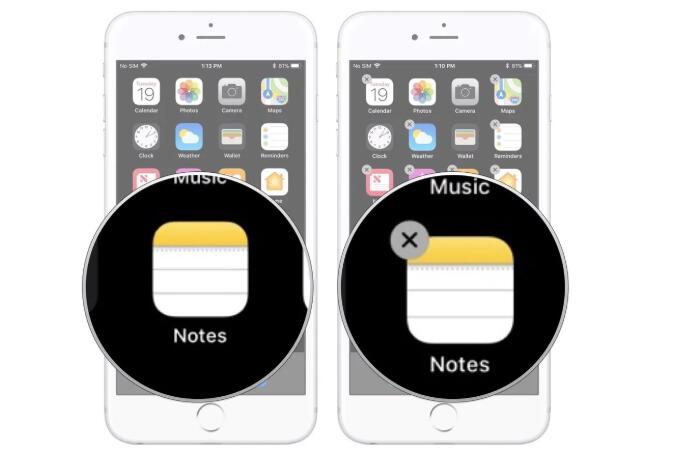
A. Tap the “x” on the Icon

This is an old method of deleting apps. In this method, you simply need to hold the icon of the app that you want to delete and tap ‘x’ when it appears.

Follow these instructions:


On the Home screen of your iDevice, tap and hold the icon of the app that you want to delete.


Keep holding the icon until it starts to jiggle.


Once the ‘x’ appears on the icon, tap on it. The app will be deleted.


B. Visit Your Device Storage Section in Settings

You can also delete apps from the storage section of the Settings app on your device.

Follow these instructions:


Launch the Settings app on your iDevice.


Navigate to General to find the list of installed apps.


From that list, select the app that you want to delete and then tap the Delete App option. The app will be deleted.


C. Delete Unused Apps in Bundle

Sponsor ads:

Gihosoft RePicvid Free Photo Recovery Software provides a free photo recovery software for windows to help users recover the deleted or lost photo for free.

If you lost data after you updated to a new iPhone, you can always use Gihosoft iPhone Data Recovery to get the data back from the old iPhone or backup.You may also like: iphonerecovery.com

7.15.2019

Deal Alert: $50 iTunes Gift Card for $40


Amazon is already offering some pretty sweet discounts on Apple products for Prime Day 2019. Sweetening that deal, the retailer is now running a Lightning deal on App Store gift card where it has discounted the $50 gift card to $40.

While iTunes Gift cards of lower or higher denominations are also available, Amazon is only offering the $10 discount on the $50 gift card. Do note that the gift card will only work in the US iTunes Store and not with other accounts.

The lightning deal itself will last for another 11+ hours but it is likely that the deal will run over before that. The gift card will be physically delivered to your US address and there won’t be an online delivery like some sellers on eBay usually do.

You can use an iTunes gift card towards app purchases on the iOS App Store. Additionally, it can also be used for purchases in the iBooks Store, and the iTunes Store towards your purchase of music, movies, and more. You can also use the iTunes gift card towards an Apple Music subscription which would essentially help you score a subscription to the music streaming service at a discount.Sponsor ads:

Gihosoft RePicvid Free Photo Recovery Software provides a free photo recovery software for windows to help users recover the deleted or lost photo for free.

If you lost data after you updated to a new iPhone, you can always use Gihosoft iPhone Data Recovery to get the data back from the old iPhone or backup.You may also like: iphonerecovery.com


Deal

7.10.2019

Apple Seeds Sixth Beta of iOS 12.4 to Developers

Apple Seeds Sixth Beta of iOS 12.4 to Developers

Apple today seeded the sixth beta of an upcoming iOS 12.4 update to developers, two weeks after seeding the fifth iOS 12.4 beta, and nearly two months after releasing iOS 12.3, a major update that introduced a revamped TV app.


Registered developers can download the new iOS 12.4 beta from Apple's Developer Center or over-the-air once the proper configuration profile has been installed from the Developer Center.


There were no new features discovered in the first five iOS 12.4 betas, so it's not entirely clear what's coming in the update. As a more significant 12.x update, it's possible that the update is focusing on a feature that's not yet available -- the Apple Card.


Apple is planning to release the Apple Card in the summer, so iOS 12.4 could be the update that prepares the iOS operating system for that launch, adding hidden features that will be unlocked when the update becomes available to the public. If we find new features in the sixth beta of iOS 12.4, we'll update this post.


iOS 12.4 may be one of the last updates to the iOS 12 operating system as Apple transitions to iOS 13, set to launch this September.Sponsor ads:

Gihosoft RePicvid Free Photo Recovery Software provides a free photo recovery software for windows to help users recover the deleted or lost photo for free.

If you lost data after you updated to a new iPhone, you can always use Gihosoft iPhone Data Recovery to get the data back from the old iPhone or backup.You may also like: iphonerecovery.com

7.04.2019

Apple iCloud Services and Retail Store Systems Facing Nationwide Outage [Update]


Another day, another outage! Yesterday WhatsApp, Facebook, and Instagram suffered from an outage. Today Apple’s iCloud Services and Retail Store systems are not available for some users. System Status is showing that services like Find My Friends, Find My iPhone, Game Center, Photos and Screen Time are affected.

Users are reporting the outage on social media. Apple says that only some users are affected. However, going by the social media posts the issue seems to be affected quite a lot of people. Meanwhile, Apple is also having an issue with retail store systems. Employees are unable to complete purchases or process support requests.


Shannon Benovitz

@SBenovitz

@AppleSupport when is iCloud going to be working again? My phone is broken and @Apple store says they can’t help me today because it’s a national outage to transfer my data and they have never seen this before.

2

1:23 AM - Jul 5, 2019

Twitter Ads info and privacy

See Shannon Benovitz's other Tweets

Apple has labeled most of the iCloud services as “Users may be experiencing a problem with the service.” Apparently one of the users had visited Apple Store to get her iPhone fixed, however, it was not possible due to the outage. Even Apple Pay is reportedly facing downtime and the payments are not being processed.


wakaidev

@wakaidev

Systems are down completely @apple store international plaza Tampa, Fl. Can’t even get my watch fixed

1

1:27 AM - Jul 5, 2019

Twitter Ads info and privacy

See wakaidev's other Tweets

Update: Nearly all of Apple’s Cloud services are up and running. At the time of writing only iCloud Calendar, Contacts and Reminders are facing issues. Apple has also mentioned that it has resolved two issues related to Apple Pay and issues related to FInd My Friends and Find My iPhone.

Sponsor ads:

Gihosoft RePicvid Free Photo Recovery Software provides a free photo recovery software for windows to help users recover the deleted or lost photo for free.

If you lost data after you updated to a new iPhone, you can always use Gihosoft iPhone Data Recovery to get the data back from the old iPhone or backup.You may also like: iphonerecovery.com